
You need a business card creator that makes a strong first impression. A good tool helps you produce a clear, memorable card fast. Do you want a physical card, a digital card, or both?
Mobile and digital features let you share contact details instantly. Recent surveys show over 70% of professionals still exchange physical cards at events, so print quality matters. Which card will you choose to represent your brand?
What is a business card creator?
A business card creator is a tool that helps you design and produce business cards. You pick a template, add your logo, and set brand colors. You export a print-ready file or a digital card. You share the digital card via QR code or NFC.
Which features matter most when you choose a creator?
What design controls do you need? You should get a true drag-and-drop editor and precise alignment guides. You should get vector export in PDF for printers. You should get CMYK color support and bleed settings. You should get spot-finish options like foil and emboss.
What brand tools should a creator include? You should get a Brand Kit with saved logos, fonts, and palettes. You should get automatic color contrast checks. You should get font pairing suggestions that match your niche.
What digital features add the most value? You should get QR code generation and vCard export. You should get NFC-ready file formats or integration with tap-to-save services. You should get analytics that show how often recipients open your digital card.
Which tools perform best for different needs?
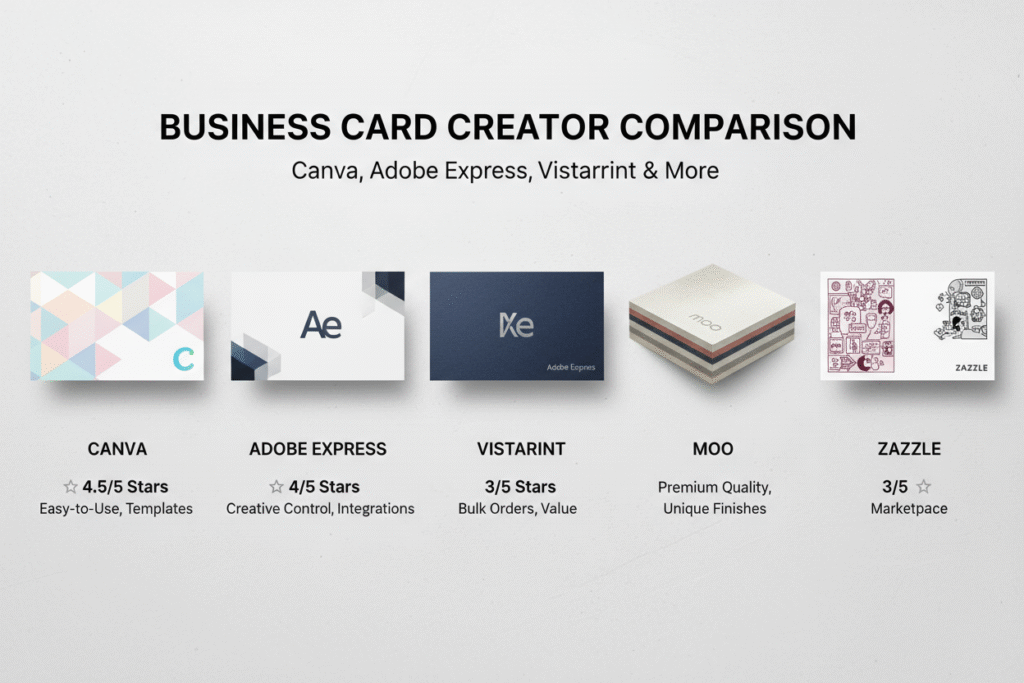
Which tool fits a creative beginner? Canva fits users who want fast visual work and many templates. The editor stays simple. The free plan covers most needs.
Which tool fits fast branded work? Adobe Express fits users who need Adobe Fonts and stock assets. The templates match enterprise style. The premium plan unlocks full font licensing.
Which tool fits print-first professionals? Vistaprint fits users who need advanced paper stocks and specialty finishes. The print options include foil, spot UV, and custom shapes. Design stays free while printing costs apply.
Which tool fits DIY home printers? Avery Design & Print fits users who print on Avery sheets. The templates match paper stock sizes. The tool includes a built-in QR code maker.
How do modern creators use AI and AR?
What can AI do for your layout? AI can propose layout options from a single logo and a short brief. AI can pick font pairs and hierarchy that boost legibility. AI can generate multiple mockups so you can pick the strongest one.
What can AR preview add to your process? AR lets you view the card on a desk or in a wallet. AR helps you check scale and visual weight before you print. AR reduces costly reprints.
What are the best free options and offline tools?
Which free online tools give the most value? Canva Free gives hundreds of templates and export options. Adobe Express Free gives polished brand templates. Avery Design gives printable templates for home use.
Which offline downloads work well? CardWorks and Business Card Designer Plus give you offline editors and local file control. The tools let you export print-ready PDFs without an internet connection.
How should you choose the right creator today?
What decision factors matter most? You should match the creator with your outcome: digital share, premium print, or DIY print. You should test a template then run a print proof. You should check font licensing if you use paid fonts.
What quick checklist should you use before you order prints? You should check the bleed and trim. You should check the CMYK conversion. You should order a paper sample and a proof. You should validate QR codes on multiple phones.
Final question
Which choice will boost your first impressions? You pick Canva or Adobe Express if you need quick, stylish cards. You pick Vistaprint if you need luxury finishes. You pick Avery if you print at home. You pick an AI-powered generator when you want automated layout options.
FAQs
What is a business card creator?
A business card creator is a tool that lets you design and export business cards. You pick a template, add your logo, set brand colors, and export a print-ready file or a digital card.
Do I need a digital business card?
You need a digital card if you network on mobile or attend hybrid events. Over 70% of professionals still exchange physical cards at events, so you should have both a printed and a digital option.
Which file formats should a creator export?
A creator should export PDF, PNG, and JPG. You should get a vector PDF for print and high-resolution PNG for online use.
How do I ensure print quality?
You must check bleed, trim, and CMYK color. You must order a paper sample and a printed proof before large runs.
Are free business card creators any good?
Free creators can deliver professional results for most needs. You should upgrade when you need advanced brand control, font licenses, or premium paper options.
What digital features matter most?
You should get QR codes and vCard export. You should get tap-to-save or NFC support if you want instant contact transfer.
How does AI help a business card creator?
AI can suggest layouts and font pairs based on your logo and industry. AI can generate multiple mockups so you can pick the clearest design.
Which option suits high-end print finishes?
You should choose a print-first service that offers foil, emboss, spot UV, and thick card stocks. You should confirm die-cut and custom shape capabilities before you order.
How do I protect font and logo rights?
You must confirm font licensing in the creator terms. You must upload a high-resolution logo in vector format when available.
How do I pick the right tool for my needs?
You should match the tool to your outcome: a quick digital share, a premium printed card, or a DIY home print. You should test one template and run a print proof before bulk orders.
QuickFast Uncover timely stories, fast.