
BankMobile Disbursements, powered by BM Technologies (BMTX, Inc.), is a trusted solution that higher education institutions use to manage the student refund process. When you receive federal or state financial aid, your tuition, fees, and other charges are deducted first. If your award exceeds those expenses, the remaining balance — called a financial aid refund — is securely delivered through BankMobile.
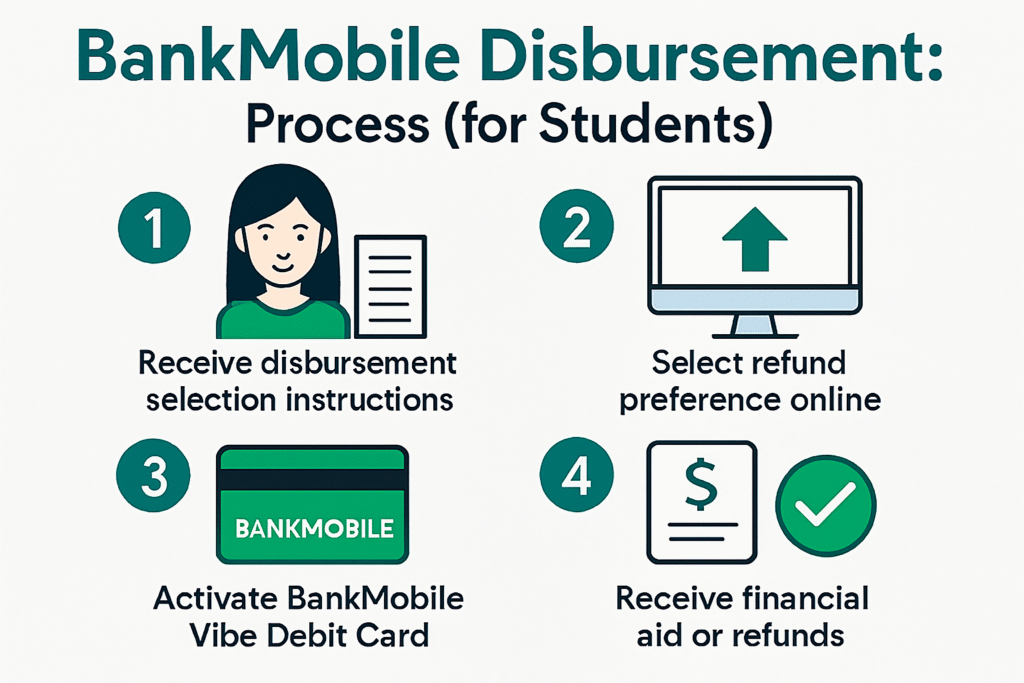
You are given flexibility in how to receive your funds. After enrollment and financial aid processing, you receive a Refund Selection Kit along with a Personal Code. Using this code, you log in at RefundSelection.com to select your refund preference.
Refund options include:
- Direct deposit to your personal bank account.
- Deposit into a BankMobile Vibe Checking Account.
- Paper check (available in limited cases depending on your institution).
BankMobile simplifies the refund process by offering secure, fast, and customizable delivery methods, ensuring you can access your money with confidence.
What Is BankMobile Disbursement?
BankMobile Disbursements, powered by BMTX, Inc., is a technology solution used by colleges and universities to deliver financial aid refunds. When you receive federal or state aid, funds are first applied to your student account to cover tuition, fees, and bookstore charges. If your award exceeds expenses, the remaining balance — called a financial aid refund — is disbursed through BankMobile.
How Does BankMobile Disbursement Work?
After your financial aid information is processed, you receive a Refund Selection Kit from BankMobile. This kit includes a Personal Code sent to your registered email. You use this code to log in at RefundSelection.com and select how you want to receive your money.
Refund options include:
- Direct deposit to your personal bank account.
- Deposit to a BankMobile Vibe Checking Account.
- Paper check (available in limited cases).
What Is the Meaning of Bank Disbursement?
A bank disbursement refers to the release of funds from a financial institution to a recipient. In the context of BankMobile Disbursements, it means transferring excess financial aid funds from your student account to your chosen refund method.
How Do You Access Your BankMobile Disbursement?
You can access your refund by:
- Logging in through the BankMobile Disbursements Login Portal.
- Using the BankMobile app for mobile access.
- Tracking your BankMobile refund status online.
How Long Does BankMobile Take to Release Funds?
Refunds are usually released 1–2 business days after your school sends the funds to BankMobile. Timing may vary depending on your refund preference and your bank’s processing speed.
What If You Lose Your Refund Selection Kit or BankMobile Vibe Card?
- If you did not receive or lost your Refund Selection Kit, contact your college’s financial aid office to request a new code.
- If you lost your BankMobile Vibe Card, request a replacement through the BankMobile portal or app.
Is BankMobile Disbursement Legit?
Yes. BankMobile Disbursements is a legitimate service used by hundreds of colleges nationwide. It is a third‑party servicer contracted to manage refund delivery securely. Schools such as Gateway Technical College and Wenatchee Valley College use BankMobile to ensure students receive funds quickly and safely.
What Is the BankMobile Disbursement Schedule?
Refund schedules vary by institution. Most colleges release funds after verifying student attendance on the Census Date. Always check your school’s Student Handbook or financial aid office for specific disbursement dates.
How Do You Log In to BankMobile Disbursements?
- Login: Access your account at RefundSelection.com.
- App: Download the BankMobile app to manage refunds on the go.
- Phone Support: Call center agents are available 24/7/365 to answer questions about refunds, financial aid, or registration.
FAQs
1. What is BankMobile Disbursement?
BankMobile Disbursement, powered by BM Technologies (BMTX, Inc.), is a service colleges use to deliver financial aid refunds securely to students.
2. What does BankMobile Disbursement cover?
It covers the refund of excess financial aid after tuition, fees, and other charges are deducted from your student account.
3. How do you get a Refund Selection Kit?
You receive a Refund Selection Kit by mail or email once your financial aid is processed. It includes a Personal Code that lets you choose how to receive your money.
4. What are the refund options?
- Direct deposit to your existing bank account.
- Deposit to a BankMobile Vibe Checking Account.
- Paper check (available at some schools).
5. How do you access your BankMobile disbursement?
Log in at RefundSelection.com, use the BankMobile app, or check your student portal under financial aid and fees.
6. How long does BankMobile take to release funds?
Funds are usually released the same business day BankMobile receives them from your school. Your bank may take 1–2 business days to credit the money.
7. What if you lost your Refund Selection Kit or Personal Code?
Visit RefundSelection.com and click “I need a code,” or contact your financial aid office for assistance.
8. What if you lost your BankMobile Vibe Card?
You can request a replacement through the BankMobile portal or app.
9. Is BankMobile Disbursement legit?
Yes. It is a third‑party servicer contracted by colleges nationwide to manage refunds securely. Institutions such as Gateway Technical College and Sierra College use BankMobile.
10. Who do you contact for help?
BankMobile offers 24/7/365 call center support. You can also reach your school’s financial aid office for refund‑related questions.
Key Takeaways
- BankMobile Disbursement delivers excess financial aid refunds securely.
- You select your refund method using a Refund Selection Kit and Personal Code.
- Refunds are usually available within 1–2 business days after funds are sent.
- Coverage includes BankMobile login, refund status, disbursement schedule, and Vibe account options.